
Home Recording Studio Essentials for Unsigned Artists
Building a home recording studio is a big project, right? It takes months of research, planing and preparation.
The Truth is…  Getting started is far easier than you might imagine. Because, in reality,  all you need is a few basic essentials.
Why Simple is Best
The fact is, not only is it possible to start off with just a simple studio…it’s actually preferable.
Because just like with any hobby, by attempting too much too soon:
You get overwhelmed,
you get discouraged, and…
you eventually quit.
And all the time and money you invest is wasted.
So to avoid this fate, just keep it simple.  But you might be wondering…
How cheap is too cheap?
Since home recording can be expensive…musicians often search for the cheapest possible solutions to recording their music.
And that’s fine, except…there is such a thing as “too cheap“.
While it is technically possible to build a working studio for as little as $400-$500…
There are low limits to what can be accomplished in such a studio…and we really wouldn’t recommend it to anyone truly serious about recording their music.
Before we dive in, let’s take a look at what you’re going to need to purchase, noting that you may not want or need some of these items and some you may be able to get for free:
- A microphone
- An audio interface
- Digital Audio Workstation (DAW) software
- A digital keyboard
- Studio monitors
- Headphones
- Cables
This list assumes, of course, that you already have a computer. You don’t need the fastest computer to record and mix music, but it should be reasonably fast. Anything with a Core i- or even Core 2-series processor should do the trick. Just don’t use a netbook. If you were to buy everything on the above list you’d be looking at a budget of about $600, but you may not need it all, be able to get some items for free, save money by buying gear that is just as good used, and just skip a few things because they won’t matter to you. Let’s go over each option.
The Microphone

The microphone might be the most vital component of your home studio because the whole point of the studio is to record audio. That said, when you’re shopping on the lower end you can actually get some really good mics for $100 or less. If you want to go completely bare-bones and just buy a microphone, you can pick up a USB mic like the Blue Snowball for about $100. It’s really better for podcasting than it is for music and you’ll have a lot of limitations when your home studio consists of nothing but a mic, but if you want to get started for around $100 then this is what you’re looking at.
If you can shell out a little more money for a standard mic (and the audio interface you’ll need to connect it), you’ll want to concentrate on condenser microphones with a cardioid pickup pattern. (If you don’t know much about microphone patterns, don’t worry too much right now. This is what you want for a vocal microphone in most cases, and it’s versatile enough for other uses as well.) A few good starter mics include the Studio Projects B1, AKG C2000B, and MXL 990 (if you want to go cheap). For the most part, most mics in the $100-200 range that come from reputable companies will be pretty decent.
The Audio Interface
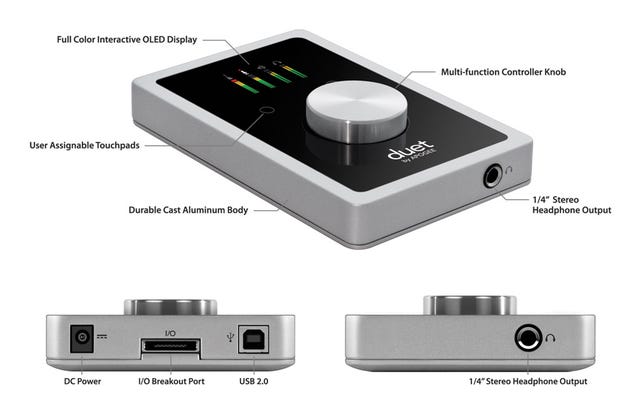
The audio interface is what connects your mics and, potentially, instruments to your computer. It also connects your studio monitors (which we’ll talk about later). A bad interface can hurt your incoming sound, so you don’t want to go with something on the really low end. In fact, you’re better picking up a nice interface like the Apogee Duet on the used market. (It’s pretty expensive otherwise, and could eat up your entire budget.) If you’re looking for something a bit cheaper, the Focusrite Saffire 6 is a good choice and will run you about $500. There are a lot of bad options out there on the low end, however, so if you’re looking for alternatives be very careful and pay close attention to reviews. You don’t want to end up with a crappy audio interface or it will hurt the sound of all your other better equipment.
DAW Software

You need software to utilize all this equipment, and the nice part is that if you bought an audio interface you probably got some for free. Many interfaces come with Cubase LE, ProTools LE, or a free version of some other popular software that will provide you with a means of recording, playing some digital instruments, adding effects, and creating a solid mix. If not, you can pick up some other stuff on the cheap or for free. On a Mac, Garageband ($15) is really your ideal option for cheap mixing. While it might seem a little limited, it’s actually capable of quite a bit once you get into it. It’s also a good way to learn how things work when you’re new to mixing since it holds your hand quite a bit. Sequel is another option and is cross-platform, but it’s a bit more expensive ($80). Reaper is a slightly cheaper option for Windows, coming in at $60. On the free side, Ardour is a nice option for Mac and Linux. For Windows (and Linux, of course), check out LMMS.
Digital Keyboard

If you’re recording live music and live music only, a digital keyboard is probably unnecessary. It’s primary purpose is for playing synthesized and sampled instruments. If you plan to add sounds to your music that are generated by software, you’ll need one of these. While a standard piano has 88 keys, most digital keyboards aren’t very good at replicating a piano and so you don’t really need one that big.
Generally, for most, a 49-key keyboard will do and you can pick one up for less than a few hundred bucks. M-Audio makes a decent cheap option called the Keystation 49. You can also get 61 and 88 key versions if you want more, or you can get a very portable mini version with 32 keys. These keyboards don’t offer much in the way of fancy features, but will be sufficient for basic input.
If you’re getting something cheap, you should buy new. The keyboards aren’t very expensive on the low end, you won’t save much used, and the cheaper stuff isn’t constructed as well as it could be. You may get a cheap keyboard that’s on the verge of breaking if you buy used. If you’re trying to pick up something more expensive, however, you’ll be in better shape. Digital keyboards in the $500+ range tend to go for a lot less on sites like Craigslist, and their build quality is almost always sturdy enough that you’ll be able to tell if you’re buying a keyboard in good shape.
Studio Monitors

Studio monitors is basically a fancy name for speakers, but they’re a little different. Generally when you get a pair of speakers for your computer you plug them in with a single cable even though there are two (or more) of them. They will have cables connecting each other, buy you use a stereo cable to connect them to your computer. These computer speakers generally provide colored sound, meaning the audio signal will be emphasized in some way. Nowadays that usually means a heavy bass and sharp high ends with no mid-range. Basically, you’re not getting a clear picture of the sound with computer speakers. This isn’t so bad when you’re watching a movie or listening to certain types of music, but when you’re trying to mix you don’t want the speakers changing what the sound actually sounds like. That’s where studio monitors come in.
No set of studio monitors are going to give you perfectly uncolored sound, and no monitors are going to sound exactly alike. That said, a decent pair will provide you with sound that’s close enough to reality that you can trust what they sound like. Because they’re going to be so important to your mix, you don’t want to cut costs here. Buy a new pair, as damage may not always be obvious in a used set, and set aside a few hundred dollars. One of my favorite cheap sets is the Samson Resolv A6. They run about $400 Â and provide a very clear sound. There are other options, of course, so if you want to go searching for something else just aim around that $150 price point and you should be in good shape.
Headphones

A really good pair of headphones will run you about $400, but you can get by with something less. If you’re purchasing studio monitors, you can go a lot cheaper and just use your headphones for reference purposes. (Referencing just means checking what the mix is going to sound like on equipment that isn’t designed for mixing and will be more like what people will hear in the real world.) While you’re definitely better off mixing with studio monitors, as headphones will not give you a realistic representation of a stereo mix, if you’re intent on doing it for some reason just be sure to pick a good pair. Sennheiser’s HD series are very good and a pair like the HD555s can be acquired for little more than $100. They make for a good reference set, but you could get away with mixing with them if you absolutely needed to. For a little more you can grab the HD25-1 IIs. Again, mixing with headphones is not the best idea but having a good pair for reference is.
Cables

Depending on what you buy, you’re going to need a variety of cables. If all you end up getting is a USB microphone, chances are you won’t need any cables at all. You might need a USB cable but generally the microphone comes with one since it’s basically unusable without it. When going the audio interface route, so you have greater options, you’ll need XLR cables for your microphone(s) and 1/4″ TS cables for your studio monitors (and guitars, potentially). You can pick up most of these for just a few bucks each and that’s all you’ll really need. If you can afford an extra of each, however, it helps to have them around in case a cable goes bad.
Now What?
Once you’ve got all your equipment you just need to hook it all up and install the software drivers (if necessary). You’ll also want to install your DAW software and tell it to use your new audio interface and digital keyboard. Of course this much is obvious. You’re going to need to learn a little about mixing and working with your software. If you want to save some cash, go to your local library. You might actually be surprised how many books there are on basic audio mixing. They might be a little old, but the principles haven’t changed much.